Monday, February 26, 2007

Thing 17: Playing around with PBWiki

"Sandbox" is the term that wikis often use to describe the area of the website that should be used for pure play. For this discovery and exploration exercise, we’ve set up a whole Learning 2.0 Favorites wiki* that’s for nothing but play!


For this “explore-and-play-with-wikis” exercise, you are asked to add an entry or two to the PBwiki Learning 2.0 wiki. The theme of this wiki is simply “Favorites” : Favorite books, favorite vacation spots, favorite restaurants, favorite anything …all you need to do is play and add your thoughts. To mark your adventure on this site, you should add your blog to the Favorite Blogs page.
Discovery Resources:

Discovery Exercise:

  1. Access the PLCMC Learning 2.0 wiki and create a login account for yourself.

  2. Add your blog to the Favorite Blogs page. That's how we'll know that you've been there. It’s easy to do if you follow this simple syntax:
Example:
[ URL Title of blog]

[ http://plcmclearning.blogspot.com Learning 2.0 ]

With brackets [ ] and just a little typing, you’ve added a link - yup, it’s as easy as that!

OPTIONAL: Add a favorite or two to a few other pages (Favorite books, favorite vacation spot, etc). And, if you feel up to the challenge, you might even want to create a separate page for book review or short travel essay and link up to that.

3. Create a post in your blog about the experience.

Wednesday, February 21, 2007

Thing 16: So what’s in a wiki?


A wiki is a collaborative website and authoring tool that allows users to easily add, remove and edit content. Wikipedia, the online open-community encyclopedia, is the largest and perhaps the most well known of these knowledge sharing tools. With the benefits that wikis provide the use and popularity of these tools is exploding.

Some of the benefits that make wikis so attractive are:
  • Anyone (registered or unregistered, if unrestricted) can add, edit or delete content.
  • Tracking tools within wikis allow you to easily keep up on what been changed and by whom.
  • Earlier versions of a page can be viewed and reinstated when needed.
  • And users do not need to know HTML in order to apply styles to text or add and edit content. In most cases simple syntax structure is used.

As the use of wikis has grown over the last few years, libraries all over the country have begun to use them to collaborate and share knowledge. Among their applications are pathfinder or subject guide wikis, book review wikis, ALA conference wikis and even library best practices wikis.

Discovery Resources:

Discovery Exercise:

  1. For this discovery exercise, you are asked to take a look at some library wikis and blog about your finding. Here’s a few examples to get you started:

2. Create a blog post about your findings. What did you find interesting? What types of applications within libraries might work well with a wiki?

So what's in a wiki? Find out by doing some exploring on your own.

Friday, February 16, 2007

Thing 15: On Library 2.0 & Web 2.0 ...

Library 2.0 is term used to describe a new set of concepts for developing and delivering library services. The name, as you may guess, is an extension of Web2.0 and shares many of its same philosophies and concepts including harnessing the user in both design and implementation of services, embracing constant change as a development cycle over the traditional notion of upgrades, and reworking library services to meet the users in their space, as opposed to ours (libraries).
Many have argued that the notion of Library 2.0 is more than just a term used to describe concepts that merely revolve around the use of technology; it also a term that can be used to describe both physical and mindset changes that are occurring within libraries to make our spaces and services more user-centric and inviting. Others within the profession have asserted that libraries have always been 2.0: collaborative, customer friendly and welcoming. But no matter which side of the debate proponents fall, both sides agree that libraries of tomorrow, even five or ten years from now, will look substantially different from libraries today.
Discovery Resources:
Five Perspectives:

Wikipedia – Library 2.0 Library 2.0 Discussions (list of great references from Wikipedia)

Discovery Exercise:

  1. Read two or three of the perspectives on Library 2.0 from the list above.
  2. Create a blog post about your thoughts on any one of these? Library 2.0 - It's many things to many people. What does it mean to you?

Thursday, February 15, 2007

Thing 14: Getting not-so-technical with Technorati


So now that you’ve been blogging for awhile, you might be wondering just how big the blogosphere is. Well, according to Technorati, the leading search tool and authority for blogs, the number of blogs doubles just about every 6 months with over 55 million blogs currently being tracked by the site. If the blogging trend continues, it is estimated that Technorati will have tracked its 100 millionth blog in just 5 months. Yes, these numbers are astounding, but as you’ve already seen for yourselves, blogging is so easy that these publishing tools are being taken advantage of by almost every industry, including libraries.

So how does a person get their blog listed as part of the blogosphere and how can you tag your posts with keywords to make them more findable through a Technorati search? The answer to the first question is that your blog is probably already being captured by Technorati due to the fact that you're already using Blogger, the most popular blogging tool. But if you want to join the party and have your blog officially listed on Technorati and also take advantage of the watchlist and other features, you’ll need to claim your blog yourself. As for tagging posts with Technorati tags? This is easy, too. All you need to do is add a little bit of HTML code to the bottom of your post (see my example below) and Technorati will pick up these tags when it spiders (or web crawls) your site.

There are a lot of new features that have been added to Technorati this past summer, including new ways to search for blogs. You can search for keywords in blog posts, search for entire blog posts that have been tagged with a certain keyword, or search for blogs that have been registered and tagged as whole blogs about a certain subject (like photography or libraries).
Discovery Resources:

Technorati Tour – videocast of new features & new look
Technorati Discover & Popular features

Discovery Exercise:
  1. Take a look at Technorati and try doing a keyword search for “Learning 2.0” in Blog posts, in tags and in the Blog Directory. Are the results different?
  2. Explore popular blog, searches and tags. Is anything interesting or surprising in your results?
  3. Create a blog post about your discoveries on this site.

OPTIONAL: If you're up for a challenge, learn how to tag your posts by with Technorati tags so they can join tag searches. Create a post about something. It can be anything you want and add the HTML code to the bottom to tag it as “L2LCPL.” You may also want to consider claiming your blog and creating a watchlist. NOTE: When adding HTML code, you'll want to make sure you're in Blogger's Edit HTML window.

There's a lot to explore.

Technorati Tag: L2LCPL

Tuesday, February 06, 2007

Thing 13: Tagging, folksomonies & social bookmarking in Del.icio.us

Tagging is an open and informal method of categorizing that allows users to associate keywords with online content (webpages, pictures & posts). Unlike library subject cataloging, which follows a strict set of guidelines (i.e.Library of Congress subject headings), tagging is completely unstructured and freeform, allowing users to create connections between data anyway they want.

In the past few weeks, we’ve already explored a few sites – Flicker and LibraryThing to name two --that allow users to take advantage of tagging. Many even used a common tag (L2LCPL) to create an association between photos that we individually uploaded. This week, in addition to exploring Technorati tagging, we want to also take at popular social bookmarking site called Del.icio.us (typed in as http://del.icio.us).

Del.icio.us is a social bookmarking manager which allows you to bookmark a web page and add tags to categorize your bookmarks.

Many users find that the real power of Del.icio.us is in the social network aspect, which allows you to see how other users have tagged similar links and also discover other websites that may be of interest to you. You can think of it as peering into another users’ filing cabinet, but with this powerful bookmarking tool each user's filing cabinet helps to build an expansive knowledge network.

For this discovery exercise, you are asked to take a look at Del.icio.us and learn about this popular bookmarking tool.

Discovery Resources:

Discovery Exercise:

  1. View the 12 minute Del.icio.us tutorial to get a good overview of its features.
  2. Take a look around Del.icio.us using the L2LCPL account that was created for this exercise. Note: In this account you will find lots of resources that have been highlighted or used throughout the course of the Learning 2.0 program.
  3. Explore the site options and try clicking on a bookmark that has also been bookmarked by a lot of other users. Can you see the comments they added about this bookmark or the tags that they used to categorize this reference?
  4. Create a blog post about your experience and thoughts about this tool. Can you see the potential of this tool for research assistance? Or just as an easy way to create bookmarks that can be accessed from anywhere?

OPTIONAL: If you’re up to the challenge, create a Del.icio.us account for yourself and discover how this useful bookmarking tool can replace your traditional browser bookmark list. You might even want to explore Del.icio.us’ latest addition, a network badge.

Note: If you do setup a Del.icio.us account, here’s a quick word about the Del.icio.us Buttons. DO NOT INSTALL THE BUTTONS ON LCPL COMPUTERS!!! You can skip this step by scolling to the top of the webpage and clicking on the link to your favorites or post .

Friday, February 02, 2007

Thing 12: Roll your own search engine


Do you have a group of websites that are your favorites? Or a set of online resources that are similar that you frequently use to answer homework or reference questions? Well Rollyo may be the tool for you. Rollyo allows you to create your own search tool for the just the websites you know and trust.

Take a look at some of these search rolls that have already been created:

Try a search for broad terms like "homework” or “history” to see results listed from multiple sites.

Discovery Exercise:

  1. Explore Rollyo and create an account for yourself.
  2. Create a search roll for any subject you like.
  3. Create a post in your blog about your experience and link to your search roll. Can you see a potential use for tools like this?

OPTIONAL: Add your searchroll to your blog using the "Create a Searchbox" tool.

Rollyo - You just never know when this little tool might come in handy.

Wednesday, January 31, 2007

Thing 11: A thing about LibraryThing


Are you a book lover or cataloger at heart? Or do you enjoy finding lost and forgotten gems on the shelf to read? Then LibraryThing may be just the tool for you. Developed for booklovers, this online tool not only allows you to easily create an online catalog of your own it also connects you to other people who have similar libraries and reading tastes. Add a book to your catalog by just entering the title -- It’s so easy that you don’t even need MARC record training to do it – or connect with other users through your similar reading tastes. There are lots of ways to use LibraryThing. You can even view your books on a virtual shelf, add a widget (see sidebar for sample) to display titles that are in your catalog or install a LT Search box on your blog.

So why not join the ranks and create your own library online. With over 65,000 registered (BTW: LibraryThing also has group forum for librarians users and over 9 million cataloged books, you're bound to discover something new.


Discovery Resources:


Discovery Exercise:


  1. Take a look around LibraryThing and create an account.

  2. Add a least 5 books to your library.

  3. Blog about your findings and be sure to link to your LibraryThing catalog.


Wednesday, January 17, 2007

Thing 10: Play around with Image Generators


Generators? No, I’m not talking about those gas powered back-up things. The generators I’m talking about allow you to easily manipulate image and graphics to create fun images like these:

ImageChef.com - Create custom images ImageChef.com - Create custom images ImageChef.com - Create custom images

For this discovery exercise, I just want you to have fun. Find a few fun image or text generators to play around with and write a post in your blog about one of your favorites and display the result. Often adding the image you mocked up to your blog is as simple as copying and pasting code that the page provides. If not, you may just need to right click on the image and then save it to your hard drive before using Blogger’s image button to add it to your post.

If you’re having difficulty getting your image added to a post in your blog, ask a co-worker for help. In looking at several staff blogs, it’s easy to see that we have lots of people in the system who have figured out how easy it is to add images to their blogs.

Discovery Resources:
Also try searching for online generators, text generators or image generators!

Discovery Exercise:
  1. Play around with some image generators and find one that you like.
  2. Post the result of your discovery process in your blog.

Note: Be sure to include a link to the image generator itself, so other participants can discover it too.

So take some time and have fun with this exercise. And remember to be tasteful too!


Thing 9: Finding Feeds

Now that you have a newsreader (your Bloglines account), you can begin adding other newsfeeds that interest you. There are several ways you can locate newsfeeds:
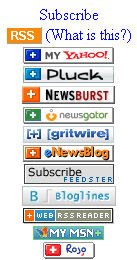
  • When visiting your favorite websites -- look for news feed icons that indicate the website provides it. Often a feed icon will be displayed somewhere in the navigation bar of the site. (Here's an image that contains a sampling of several feed icons).
  • Use Blogline's Search tool - Bloglines recently expanded search tool lets you search for news feeds in addition to posts, citations and the web. Use the Search for Feeds option to locate RSS feeds you might be interested in.
  • Other Search tools that can help you find feeds:
  1. Feedster - One of the largest collections of RSS feeds, Feedster lets you search for feeds in three categories: news, blogs & podcasts.
  2. Topix.net - This search tool allows you to locate recent newsfeed items based upon keyword or phrase searching. The tool focuses specifically on news and media outlet RSS feeds for information, not weblogs.
  3. Syndic8.com - Syndic8 is an open directory of RSS feeds that contains thousands of RSS feeds that users have submitted.
  4. Technorati - Technorati is a popular blog finding tool that lets you search for blogs. Since RSS feeds are inherent to all blogging tools, Technorati Blog Search can help you find RSS feeds for topic specific blogs you may be interested in. Additonal Resource: Technorati Tutorial on finding and adding your blog.

Discovery Excercise:

  1. Explore some of the search tools noted above that can help you locate some news feeds.
  2. Create a blog post about your experience. Don't know what to blog about? Here some questions to think about ...

Which method of finding feeds did you find easiest to use? Which Search tool was the easiest for you? Which was more confusing? What kind of useful feeds did you find in your travels? Or what kind of unusual ones did you find? What other tools or ways did you find to locate newsfeeds?

Tuesday, January 16, 2007

Thing 8: Make life "really simple" with RSS & a newsreader


You’ve heard of RSS? You’ve seen those small funny tags on websites? You’ve heard co-workers and acquaintances swear by it, but still have no idea what RSS is? Well don’t worry, according to a recent survey you’re still in the majority, but this is changing rapidly. In the information world, RSS is not only revolutionalizing the way news, media and content creators share information, but it also is swiftly changing the way everyday users are consuming information.

RSS stands for “Really Simple Syndication” and is a file format for delivering regularly updated information over the web.

Just think about the websites and news information sources you visit every day. It takes time to visit those sites and scour the ad-filled and image-heavy pages for just the text you want to read, doesn’t it? Now imagine if you could visit all those information sources and web pages in just one place and all at the same time … without being bombarded with advertising… without having to search for new information on the page you’d already seen or read before… and without having to consume a lot of time visiting each site individually. Would that be valuable to you? Well, it’s available now through a newsreader and RSS.

This week’s discovery exercises focus on learning about RSS news feeds and setting up a Bloglines account (a free online newsreader) for yourself to bring your feeds together.

Discovery Resources:


Discovery Exercise:


  1. Follow the discovery resources above to learn more about RSS and newsreaders.

  2. Create a free online Bloglines account for yourself and subscribe to at least 10 newsfeeds to your reader. See Using Bloglines Tutorial steps 1-3 for instructions.

  3. Create a post in your blog about this exercise. Optional: If you're up to the challenge, you can provide the URL address to your public bloglines account (find where to find this below)


Newsfeeds:


  • LCPL's List of Participants- Subscribe to several of your co-workers' feeds. This is as easy as typing the blog URL into the subscribe field in Bloglines. Try it, it's easy!

  • Then try adding a few other types of news feeds from news sources and even PLCMC's Readers Club site. (Select at least 3 from the list below to subscribe to)

  1. Washingtonpost.com - RSS News Feeds

  2. Times Community Newspapers - Loudoun County - Loudoun News

  3. Loudoun.gov RSS Feeds

  4. Reader’s Club new review feeds

  5. Unshelved - Library cartoon feed


Don’t know what to blog about? Think about these questions:
What do you like about RSS and newsreaders?How do you think you might be able to use this technology in your work or personal life?How can libraries use RSS or take advantage of this new technology?

How to find your public Bloglines URL:

Click on the Share tab within your Bloglines account:

Scroll down the right screen pane and locate the public URL

Be sure to add this as part of your post to demonstrate your completion of this activity.


Once you tackle this discovery exercise, you've tackled the most difficult one of the whole 23.

Wednesday, January 10, 2007

Thing 7: Blog about Technology


For this thing, simply blog about anything technology related. Yes, it can be anything that relates to technology! You just need to share a few thoughts.

Also be sure to add at least one comment to another participant's blog. That's what online communities are all about - connecting and communication.

Friday, January 05, 2007

Thing 6: More Flickr Fun

Ozarkland: L E A One Letter - R N I Silhouette n G 2 Period zero atsign L C P Ll


Like many web 2.0 sites, Flickr has encouraged other people to build their own online applications using images found on the site. Through the use of APIs (application programming interfaces), many people have created third party tools and mashups* that use Flickr images. Here are just a sampling of a few …
  • Mappr - allows you to take Flickr images and paste them on a map
  • Flickr Color Pickr - lets you find public photos in Flickr that match a specific color.
  • Mappr– create a photo mosaic from photos found on Flickr.

Discover more mashups, web apps, and Flickr tools.Discovery Exercise:Your discovery exercise for this “thing” is to:

  1. Explore some of the fun Flickr mashups and 3rd party tools that are out there.
  2. Create a blog post about one that intrigues you.

Personally one of my very favorite tools is FD Toys’ Trading Card Maker. And there’s a ton of librarians out there that have created their own Librarian Trading Card.So have some fun discovering and exploring some neat little apps. And if you're up to the challenge while you’re at it, why not create a trading card of your own. :)* Mashup Note: Wikipedia offers some great articles that explain mashups. Basically they are hybrid web applications that take features from one application (like Flickr) and mash it up with another (like a map). In this example, you get Mappr (http://mappr.com).

PS: Learning 2.0 image created by Spell with Flickr.

Friday, December 29, 2006

Thing 5: Discover Flickr

Podcast # 5


Photo sharing websites have been around since the 90s, but it took a small startup site called Flickr to catapult the idea of “sharing” into a full blown online community. Within the past year, Flickr has become the fastest growing photo sharing site on the web and is known as one of the first websites to use keyword “tags” to create associations and connections between photos and users of the site.

For this discovery exercise, you are asked to take a good look at Flickr and discover what this site has to offer. Find out how tags work, what groups are, and all the neat things that people and other libraries (list also here) are using Flickr for:

Discovery Resources:
· Flickr Learn More tour (6 steps)
· Mediamazine Flickr Tutorials
· Flickr: Popular tags Interesting- Last 7 days
· Flickr Services (3rd party applications & mashups) and let’s not forget to look at some other libraries on Flickr

Discovery Exercise:In this discovery exercise, you have two options…


a. Take a good look around Flickr and discover an interesting image that you want to blog about. Be sure to include either a link to the image or, if you create a Flickr account, you can use Flickr's blogging tool to add the image in your post. Another option you have for including images in your post is to use Blogger's photo upload tool.

-- OR --

b. If you're up to an easy challenge ... create a Free account in Flickr and use your location's digital camera to capture a few pictures of something in your branch. Upload these to your Flickr account and tag at least one of the images “L2LCPL” and mark it public. Then create a post in your blog about your photo and experience. Be sure to include the image in your post. Once you have a Flickr account, you have two options for doing this: through Flickr's blogging tool or using Blogger's photo upload feature.


PS: A quick word about photo posting etiquette - When posting identifiable photos of other people (especially minors) is it advisable to get the person's permission before posting their photo in a publicly accessible place like Flickr. Never upload pictures that weren't taken by you (unless you have the photographer's consent) and always give credit when you include photos taken by someone else in your blog.

Thursday, December 21, 2006

Thing 4: Register your blog and join the party ...


If you’ve made it this far, you already have three items or “things” completed of the twenty three that are required to earn the RCA Flash Memory MP3 Player.


But how do you qualify? Good question! By registering your blog and recording your progress on each of the 23 things. For the sake of simplifying this process for LCPL staff involved, you will use the LCPL L2-Log that has been created on the LCPL G Drive.


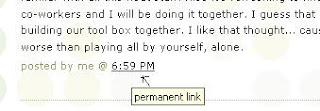
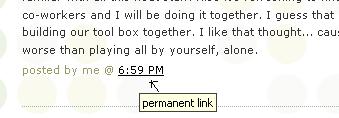
Starting with Thing #5, you also need to include the URL for the permanent link to each of your blog posts that capture your thoughts, comments or findings about your discovery process. And depending upon the Blogger template that you selected, the permanent link for each individual posts can be found either through the post’s title or through a link in the posts footer area the contains the date.


Example: Here is where you would find the perma link for this sample blog post:


Click on this link to see actual post.

If you click on the permanent link for an individual post, you will be taken to its page. This is the link that you want to use when recording your progress in the L2 Log. And to make recording easy, I would suggest that you make a habit of recording your progress weekly.

Once you are at LCPL G Drive click on the LCPL L2-Log database. Then click on forms, LCPL L2-Log. Once the form has opened hit the Ctrl & F key, type your last name in the find window and press enter. For task 1, 2, and 3 please mark a "X" for each.For task 4 please enter the URL to your blog.


So, here’s to Thing #4 – why not hop on over to now and record your first 4 items on this discovery quest. It’s really that easy and just think, now there’s only 19 more things to go. :)


PS: If you’re not LCPL staff member, you can follow along as well. Just use the list found at 43 Things to record your progress. You'll need to create a 43 Things account first. Alas, I’m sorry that I can’t include any RCA Flash Memory MP3 Player for incentives. For you, I hope just the fun of following along is enough. :)

Friday, December 15, 2006

Thing 3: Grab yourself a blog in 3 steps

Podcast #3

Now that you’ve done some exploring around this website and understand how this program will work, it’s time to setup your very own personal blog to begin recording your thoughts, discoveries and exercises in.

For this program, I am recommending that you use Blogger*, a popular free online blog hosting service that is extremely easy to use.

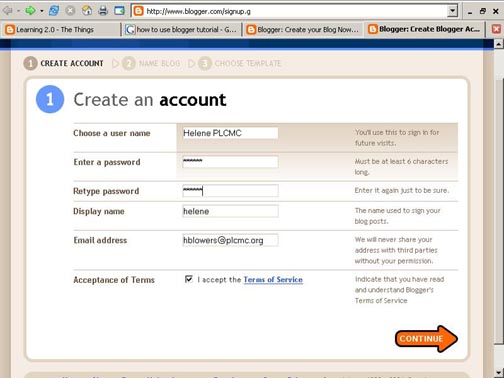
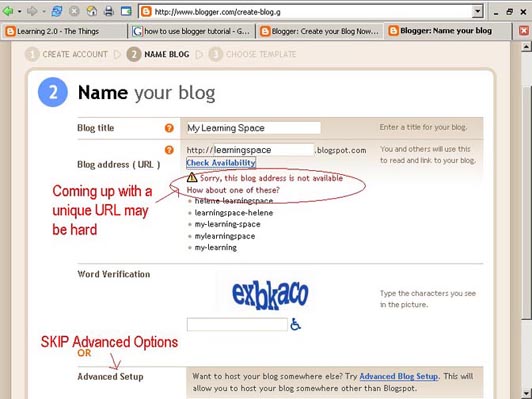
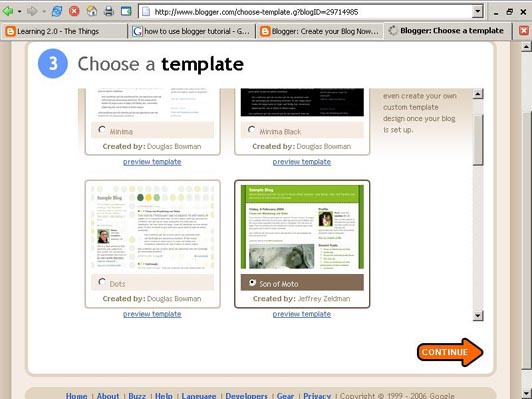
Creating a blog using Blogger takes just three steps:
1. Create an account (view screenshot)
2. Name your blog (view screenshot)
3. Select your template. (view screenshot)

Once you’ve created your blog here are two important things to know:

· To add posts: The maintenance interface that you will use to add posts, edit or change the step-up your blog is accessed online at http://www.blogger.com/ Be sure to write down your login and password.

· To view your blog: Your blog address is http://(xxxx).blogspot.com, (xxxx)=the unique identifier you entered in Step 2. Be sure to also write down your blog address.

If you run into problems or would like more information about blogs and using Blogger here are some discovery resources you can use:

· Freevlog’s Quicktime Tutorial: Setup a Free Blogger Blog Note: Ignore the opening comments about downloading Firefox if your PC doesn’t have it. This will work in Explorer just fine.

· Blogger’s Quick Tutorial
OK -- Now, it’s your turn... Discovery Exercise:
1. Setup a blog for yourself through Blogger.
2. Add a test post or two. Note: Use one of your test posts to create an entry about which habit among the 7 and 1/2 lifelong learning habits that is easiest and hardest for you & why.
3. Have fun!!!!

IMPORTANT NOTE: How you choose to identity yourself on your blog is your choice. You can blog under a screen name, anonymously, or as yourself. However in order to qualify for the RCA Flash Memory MP3 Player, you will need to email your blog link to Stephanie.hinkleylopez@loudoun.gov.

* Use of Blogger is only a recommendation. If there is another blog hosting site that you are more comfortable with, please feel free to use it.

Thursday, December 14, 2006

Thing 2: Lifelong Learning & L2


Among libraries, lifelong learning is one of those core values we shelve our books by. So it makes sense that before we embark on this new online learning and discovery journey that we should take a few minutes to review a few habits that can assist in creating lifelong learners.
These habits, which we’ve called the Seven and 1/2 Habits of Highly Successful Lifelong Learners, will provide you with a refresher on what it means to be a lifelong learner.Discovery Exercise:

1. Make sure you have headphones or speakers attached to your computer.
2. Open up the 7 & 1/2 Habits online tutorial and view the online tutorial.
3. As you watch and listen, write down which habit among the 7 & 1/2 that is easiest for you and which is hardest. You will use your personal blog (which you will set up next) to post your thoughts about lifelong learning.

Have fun! If you haven't jumped on board yet, it's never too late to become a lifelong learner.

Next Step: Creating your blog so you can begin tracking your journey. You can either jump ahead on your own without instruction or wait for the next Thing to post on December 20th.

Tuesday, December 12, 2006

Thing 1: Discovery has never been so much fun
December 13th is the offical start of LCPL
Learning 2.0 Program!!

Lets get the party started……


Welcome to LCPL's Learning 2.0 program & blog. Chances are if you've found your way here you're either:

a. a member of LCPL's staff who's participating in the Learning 2.0 program.
b. interested in learning about and playing around (yes, playing is allowed in libraries) with some new web 2.0 tools that will help you expand your information literacy toolbox.- or -
c. are just interested in earning a cool RCA Flash Memory MP3 Player.

Either way… We are so happy that you have found your way here!! Learning 2.0 is an online learning program that encourages staff to learn more about emerging technologies on the web that are changing the way people, society and libraries access information and communicate with each other. Over the course of the next nine weeks, this website will highlight “23 Things” and discovery exercises to help staff become familiar with blogging, RSS news feeds, tagging, wikis, podcasting, online applications, and video and image hosting sites.


The FAQs should answer most of your questions about this program. If not, then please add your question to the FAQ page as a comment.


So fasten your seat belts, grab your mouse and get ready for a discovery adventure… and remember it's OK to play in the library and have fun! Be sure to tune in Monday, December 18th for the next "thing" or discovery item ... or better yet, subscribe to the RSS feed.


Tuesday, December 05, 2006

LCPL's Learning 2.0 START UP!

A message from Doug


Welcome to LCPL’s Online Learning 2.0. We hope you and your colleagues will enjoy and gain many new skills along your quest for learning new technology.

Equipment you will need: You will need a computer with a sound card (check 'Mute' is off), speakers, headphones or ear buds (many of the lessons are small podcasts to listen to).

Learning 2.0 will require you to read following 3 Blogs.

1. Learning 2.0 "23 Things" This will be the focal point of the program, listing all 23 things and links you will need to follow. This was developed by Helene Blowers at The Public Library of Charlotte & Mecklenburg County (PLCMC) for their staff training. This program has been adopted by several libraries across the nation and around the world. As you progress through the 23 things you will see that we have made changes to tailor some of the exercises just for LCPL staff.
2. Learning At LCPL Our Blog on this Project which will chart OUR progress, offer help and advice. It will contain all the links back to 23 Things and Learning 2.0, plus extra links to useful websites including a list of our participants (check out your colleagues Blogs, make comments, offer encouragement, share experiences).

3. Your Blog: Post to it! Read it, edit it, have fun playing with it, Enjoy!

Wednesday, November 29, 2006

Frequently Asked Questions:

How does this online learning program work? This is a self-discovery program which encourages staff to take control of their own learning and to utilize their lifelong learning skills through exploration and PLAY. There will be no classes or workshops offered to support this program. Instead, staff are encouraged to work together and share with each other their discoveries, techniques and "how to's" both in person and through their blogs.

Is this program open to all LCPL staff or just some? This program is open to ALL LCPL staff regardless of position (full and part time). If you are not a member of the LCPL staff, you are welcome to follow along, however the library cannot award you any staff prizes for completion.

How long do I have to complete the program? The program kicks off December 13th and wraps up on Staff Development Day, June 15th.

How do I track my progress for each of the 23 Things? You will not start tracking your progress until Thing #4. Each staff member that chooses to participate in this program will be required to keep a blog to track their progress and will also need to register each item completed in the Tracking log found on LPCL Shared Drive under the Learning 2.0 folder.

If I'm not a LPCL staff member, can I still participate? Yes, by all means. However, LCPL cannot award you any incentives or prizes for completion. You can track your progress through the 23 Things list found on the 43Things site -- I know it sounds confusing 23..43 ..23 doesn't it. ;) Anyway, we welcome participants from other libraries to join in the fun and follow along.


Why 23 things instead of having participants do 43 things like the website? Given the timeframe of the program (9 weeks), the number of "things" was reduced so that staff already burdened with busy work schedules wouldn't feel overwhelmed by having too many discovery exercises to complete in a week.

Will there be any training classes offered to show staff how to do this? No, this is a self-directed learning program. If you feel you need assistance with an item, you are encouraged to be resourceful and to find a co-worker or another staff member who can help. Reading co-workers blogs can help too.

I've seen the list of 23 Things on the website, but how do I know what to do with them? Each week, two or three posts will be added to the LCPL Learning 2.0 website with details about the discovery exercises for that week. The reason for this staggered approach is to allow participants the ability to focus each week on a different area without feeling overwhelmed.

Can I work ahead through the list of items on my own? Yes, of course. You are encouraged to self-direct your discovery process, especially by working ahead on your own!! However, if you do work ahead on some items, be sure to check back on the exercise details for each item once they are posted so you can be sure to receive full credit for its completion.

What if I need help - who can I call? Since this program is self-directed and is being completed by many staff members throughout the system simultaneously, you are encouraged to work with colleagues along your discovery journey.

I would like to earn the MP3 player but don't feel comfortable with my co-workers reading my blog, can I participate anonymously? Yes & No. Since you control all the information that you share on your blog, you can choose to use a screen name to identify yourself to keep yourself anonymous. However, in order to recieve the MP3 player you will need to identify yourself on the LCPL Learning 2.0 Log. Your record of progress will only be viewable to you on the Tracking log on the LCPL Shared Drive.


Once I complete all 23 things, how do I get my prize? If you complete 23 things before June 15th, your RCA Flash Memory MP3 Player will be sent to you at your request.

List of Participants

Once we get started listed below will be the registered participants for the Learning 2.0 program. For the purposes of this program, only the blog names will be listed here. Staff may choose to reveal or conceal their identity themselves as they wish through their blogs.


02bnwmsbg
All Roads Lead To . . .
A Wandering Minstrel Eye
Aesops Girl
Appalachian Infosphere
Argonaut 15
Aztecisgone
BatcaveoSolitude
Blog 4 Virginia
Blogertainer
Blue Ridge Reader
Brad Fan
Camp Cascades
Catbird
Cats meow
CH @ Lov
Cin Hal
Cindy at Admin
Clankirk
ClickChic
Coffee Often
Cogs in Cogs
Confused-Silverfox
Daily CommonTerry
Datad
Deb Cascades
Devi's Blog
Discoveries 2-0
Doug Thinking
E Lemelin
Exploding Poptart
Flying Mousetrap
Fuzzy Dimes
Gator Gal Swamp Tromp
Giraffe Stretch
Go Ahead, Jump!
Guinea Pig Fancy
HARDLY ANY BLOG-MARTY
Hose Jocky
Hot Jungle
Kailua Bound
Kathy’s Books
Library Chic Geek
Library Happy Hour
Librarykzjoe
Library Web Stuff
Life Time Reader
Loom Lady
Lost at Sea
Lost in trans
Lotta Collies
Marcie's Page
Mason Yang
Max 'n Louie
MB's Blog
Mdog says
Meerkat's Road Food
Metro Gal
Movies-R-us
MP Stories
Munchkin Chronicles
Music and Such..
My "I can't think of a clever title" blog
My Terrible, Horrible, No Good, Very Bad Blog
Mystic Emerald Isle
MZQ Fan
Nick is a blogging
Notebook-notes79
Ohemgeeitsfe
Oh, the places you'll go, Kitty White
One Rhyme at a Time
Pepys' Red Hot Poker
Phoebe's Place
Pigsrbest2me
Plus 5 vs apathy
Polonius Questions
Purple Librarian
Radio Hedge
Rain Drops-on
Regency Reader
Sea Cascades
Spam on Toast
Spongebob
Starlight
Sterling 1971
Strange and wonderful world of Librarianship
The evening sky
The Friends of Montaigne
The Great Ragu
Tilting At Windmills
Today’s Show is Sponsored by the Number 23
Top Cat Sue
Wennie's Wikiz
Wind River Raven
Ylwbrckrd
Zoe Doodle